BEFORE YOU UPLOAD
A good photo starts with good light.
Use a real white or off-white wall, a little space behind you, and soft light from the front. Getting the photo right now saves a retake later.
What good lighting looks like
Official U.S. Department of State examples. Images below load from travel.state.gov when you view them; your own photo is never sent there.

Keep skin tones natural and the face clearly visible.
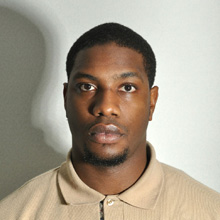
Move away from the wall and soften the light.
Your at-home setup
- Find a plain wall. Choose white or off-white. Stand several feet in front of it so shadows fall away.
- Face the light. Use soft, even lighting. Avoid overhead light and strong light from one side.
- Ask someone to take the photo. Keep the camera level and several feet away. Include the whole head and shoulders.
- Keep your appearance natural. Face forward with eyes open and mouth closed. Remove glasses for U.S. passport photos unless the official medical exception applies.
- Check before you upload. Look for blur, uneven lighting and clipped hair. Turn off portrait effects, beauty filters and background blur.
White background: capture it, don’t replace it
U.S. passport rules require an unedited photo. Background replacement is a digital alteration, even when it looks realistic. Retake the photo against a suitable wall instead.
The studio’s optional background cleanup is available only in General photo mode for uses that allow edits. It selects connected areas of similar color, not the person. Review edges carefully; it is not a compliance checker or a tool for complex backgrounds.
Choose the right output
For a U.S. paper application, the cut photo is 2×2 inches and head height is 1–1⅜ inches. The studio guide is a positioning aid; check the final printed dimensions yourself.
For U.S. online renewal, follow the official digital-photo instructions and use your original photo as required. A 2×2 print sheet is not an online-renewal upload.
Other countries and documents may require different dimensions, backgrounds or a photographer’s stamp. Check your issuing authority first.
Ready? Add your photoGuidance checked October 7, 2026. Photo examples: U.S. Department of State; inclusion does not imply endorsement.